
Management Assistance Program
Turn Down the Noise in Your Inbox
By Julie Bays, OBA Management Assistance Program Director
Lawyers receive a lot of email. Client messages, court notices, opposing counsel, calendar reminders, newsletters, vendor updates, bar communications and automated notifications all arrive in the same place. Even useful information can begin to feel like clutter when the inbox is already full.
That is why Catherine Sanders Reach’s article, “Silencing Your Noisy Inbox, Part 1,” is such a helpful reminder. Catherine discusses practical ways to reduce inbox noise, including Focused Inbox in Outlook, Gmail categories, rules and filters, unsubscribe options and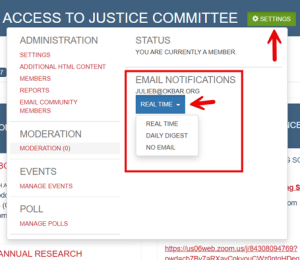 changing notification settings for accounts that send too many alerts. Her broader point is especially useful: first identify what kind of email is creating the noise, then use the right tool to manage it.
That matters because not every email that appears to come from an organization is the same type of communication. Some messages are official announcements or newsletters. Others are automated notifications from discussion forums, committees, sections or online communities a lawyer has joined.
For OBA members, this distinction is important. Courts & More is a weekly email from the Oklahoma Bar Association that shares updates from the OBA, the courts and other information intended to help lawyers improve the quality of their legal services.
In contrast, MyOKBar Communities can produce very different levels of email traffic. Some communities are relatively quiet, while others produce a steady stream of discussion emails. If you belong to an active community, those individual messages can quickly begin to overwhelm your inbox.
The good news is that you have control over the emails you receive. MyOKBar Community notification settings can be adjusted. Members may choose to receive individual emails, switch to a daily digest or reduce notifications for specific communities. For busy lawyers, the daily digest may be the best compromise. You still receive the benefit of section and committee discussions, but the messages are gathered into a more manageable format.
This approach lets you reduce inbox noise without disconnecting from useful professional conversations. Email fatigue is not just about the number of messages. It is about whether the right information reaches you at the right time, in a format you can use.
So, before deciding that “all these emails” are too much, take a few minutes to adjust the settings on the emails you can control. For MyOKBar Communities, consider changing active communities to a daily digest or turning off emails for communities you prefer to check manually. Then keep the messages that help you stay informed, competent and connected.
How to Change Your MyOKBar Community Email Settings
- Log in to your MyOKBar account at okbar.org.
- Click on MYOKBAR Communities
- Select the Section or Committee that you want to receive fewer emails.
- Click on green button next to the name of the Section or Committee that is Settings.
- Click on the blue button under EMAIL NOTIFICATIONS
- Choose Real Time, Daily Digest or No Email.